Activity Schemas, Funnel Tables, and Semantic Layers: My Preferred Data Warehouse Design
Over the years, in addition to data science and algorithmic work, I've had the opportunity to work on business data and analytics engineering. Data warehouse design is a real art, combining governance and reliability with design patterns that allow data consumers to understand the world easily and flexibly. As someone who often wears the data consumer hat, it's been a treat to learn how to do this work, enabling others (and myself!) to analyze and use data quickly, correctly, and effectively.
Across a number of dbt built-outs, I've landed on a design pattern that I like, leveraging several standard patterns:
- Kimball-style dimensional modeling -- a warehouse design pattern with decades of best practices
- Medallion architecture -- Databricks' 3-layer design for successively cleaner and more usable data
- the Activity Schema -- a design for flexibly representing customer activity as an event stream
- Data Marts -- another classic pattern for pre-digested data for specific use-cases
- recommendations from Agile Data Warehouse Design
In this post, I'll go over the patterns, with some examples and some lessons learned along the way. There are three key takeaways:
- Dimensional Modeling is still a good idea. Start there, representing entities and events the way your organization thinks about them.
- An Activity Schema fact table is very useful for representing event sequences by entities that have many interactions with your organization.
- Re-aggregated Reporting tables, paired with good Semantic Layer documentation, are critical for funnel and metric analytics to be easy and reliable, especially now with AI data consumers.
Here's how everything fits together. I'll go over some of the pieces.
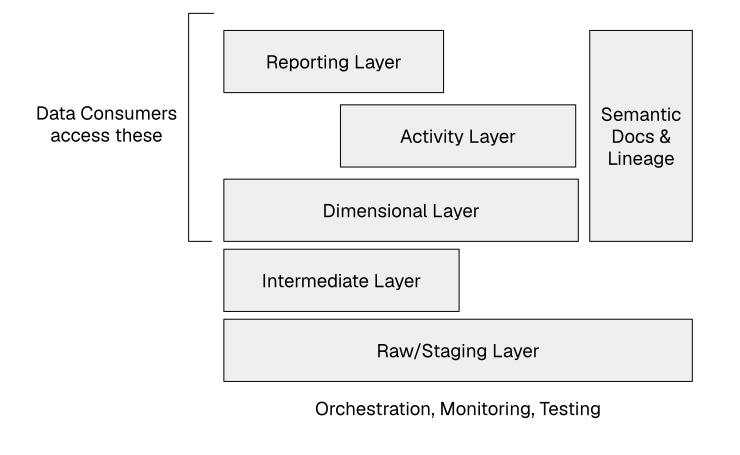
Data lands in raw tables and is normalized in staging tables. Intermediate tables do complex transformations. Dimensional layers are the foundation. Activity Schema tables and Reporting layer tables are marts based on lower-level tables. Semantic and metrics data, plus lineage, allows consumers to correctly use the warehouse. Dimensional layers and up are 'Gold' layers that consumers will see. Infrastructure underlies the system.
Dimensional Layer
I generally think the classic best practices in dimensional data modeling from Kimball and others remain correct, and a great start. Once data is cleaned up and normalized, build out dimension and fact tables in a way that reflects the organization's mental models. Here's some nuance:
Dimension (Entity) Tables
Dimension tables represent the entities that exist in the world that the organization cares about. Much of the hardest work in analytics engineering is unifying or conforming entity definitions across multiple source systems.
With a recent e-commerce client, the first thing I did was to build a dim_users table
that integrated Segment event-tracking data, of mostly
anonymous user interactions, with CommerceTools user data, reflecting interactions with the cart and checkout.
Challenges included test and internal users,
users logging in and out over time, and bot traffic. It's tricky work, but the final representations
were straightforward and easy to use.
One common variation of dimension tables,
for entities that can change over time, and where it's important to have point-in-time history for
analysis, is to have a history table with one row per historical variant. A hist_products table, for example, might include historical
prices, while dim_products might be just the current version of a catalog. It's sometimes easiest to
build the historical version first, then just filter it to the current version for the primary dimension table.
Fact (Event) Tables
Fact tables are a little more interesting because there are more variations of them than I think is obvious. A basic fact table defines something that happened at a point in time, like a website page view, or a purchase.
Speaking of time, one pattern that I recommend is that every timestamp in the data warehouse should
be represented with two time columns:
a timestamp column, in UTC timezone, and a date column in whichever timezone that the organization uses for reporting. This redundancy makes the most common path -- aggregation by reporting date -- extremely easy, yet retains the
raw data for other analyses.
Here's an example. At that same client, I had a fact_orders table with columns including the following:
order_id-- from CommerceToolscreated_at-- when the order was created, in UTCcreated_date_central-- date the order was created, in Central timeuser_id-- foreign key todim_usersorder_state-- Open, Shipped, Delivered
This is the standard pattern, one row per event, but other fact table designs are possible, and needed.
fact_order_products was multiple rows per order, one row per product in the order,
with a product_id that could be easily joined to dim_products.
I'll cover some other fact table designs below.
These are standard best practices. The most important thing is to model that world faithfully, abstracting over source systems as much as possible.
Activity Schema(s)
The Activity Schema was developed by a data engineering leader who I worked with briefly at WeWork, Ahmed Elsamadisi. Based on his experience and expertise with data warehouses and analytics, he identified a gap in standard dimensional modeling that arises with modern web data, where users can perform dozens or hundreds of actions over extended time.
The schema is a simple idea -- have an event-stream table whose grain is the conformed user ID and a timestamp. It lists, in order, everything that a user does that the organization has visibility into, with a consistent and limited set of columns. There are columns for the event type, revenue information for financial reporting, and a general-purpose JSON blob for secondary information. From that table you can do all sorts of product analytics and metrics creation. You can identify users who view your marketing page before they log in, which might be part of the definition of a funnel. You can create user activity metrics. You can do arbitrary analysis, and you can re-represent that data in all sorts of useful ways.
Here's an example from that same e-commerce warehouse -- fact_user_actions has a design mostly like this:
action_id-- a unique identifieruser_id-- foreign key todim_usersts-- timestamp, in UTCdate_central-- date, in the company's preferred timezone, to simplify aggregationsession_id-- standard web definition of a session, activity without a 30-minute breaksource-- Segment, CommerceTools, etc.action-- one of Page Viewed, Search Results Viewed, Product Clicked, Placed Order, or many morerevenue_usd-- if non-null, revenue change associated with the action (typically purchase)path-- the website path associated with the actionproduct_id-- for actions associated with a single product, foreign key todim_productsdays_since_first_such_action-- shortcut for certain repeat-action analysesother_data-- JSON object with fields that aren't join candidates, such asui_feature_nameandapplied_search_filters
Essentially, Activity Schema tables are a UNION ALL of a set of user-related facts, with a unified schema to make
sequential analysis easy. The changes I've made, compared to the published schema, are to make certain preferred analyses easier: adding the date field, adding easy-to-join foreign keys, adding path and other information
to support analysis. Many of the column names are different, to align with
other naming conventions, but the semantics are generally the same. I tend to
allow foreign keys to dimension tables more than the original design, which I think
maintains some flexibility.
What I really like about the Activity Schema is that it enables arbitrarily complex analysis without analysts needing to rebuild large data sets, while focusing on enabling the most common use-cases. Still, I've found that it's useful to have pre-digested versions of this data, which is where reporting tables come in.
Reporting Layer
There are a few different reporting layer patterns that I like, all of which are essentially domain-specific data marts. The most impactful pattern is Funnel Tables, which I'll come back to below.
Other common reporting-layer patterns that I've reused often are Entity Aggregate
and Periodic Aggregate tables. Entity Aggregate tables are often sidecars next to
dimensional entity tables -- dim_users might have an rpt_users table with
the total number of purchases, average session duration, or other commonly used
aggregations that are easy to compute from lower level tables. This keeps
the primary dimension table clean and mostly static. Periodic Aggregate
tables, such as rpt_weekly_user_activity give commonly used business metrics at
a glance.
These are really standard data mart designs, but it's worth noting how easy it is to build them from
Activity Schema tables. All of the work goes into the lower-level design, keeping the aggregation
queries as simple as just a group-by and sum.
Funnel Tables
A few years ago, I helped rebuild the data warehouse of a B2B SaaS company for better business analytics. A key design consideration was to have full visibility of the sales and marketing funnel from the time of initial lead contact all the way through to a contract being signed. The data spanned several different source systems of record.
We had a version of an Activity Schema fact table, at the level of the potential customer. This provided a long
list of actions that happened at various points in time, but it didn't define a funnel.
So we built a Reporting layer for this funnel that explicitly re-represents data from
Dimensional and Activity Schema tables. The table was called something like rpt_new_business_funnel
and it was a single wide row per opportunity. (An opportunity is just that -- an opportunity for a
potential customer to purchase. Renewals were excluded, as this was marketing-focused.)
A simplified version of the funnel was something like:
opportunity_id-- unique keycompany_id-- foreign key todim_companyfirst_seen_at-- a timestampfirst_seen_channelfirst_lead_created_atfirst_lead_categoryfirst_call_atfirst_call_sales_person_idcontract_signed_atcontract_value_usdclosed_atoutcome-- Closed-Won, Closed-Lost
The -at columns are timestamps, with test-enforced constraints: a timestamp at an earlier stage cannot
be later than one at a later stage, and no stages may be skipped.
This funnel property is why so many of the columns have "first" in the name.
With those constraints, it's easy to calculate conversion metrics from one stage to the next,
to analyze those metrics over various time scales,
and to slice-and-dice these metrics by various factors.
For example, you could compute conversion metrics by marketing channel, or by sales person.
Or joining against sales hierarchy tables, by sales region. You can calculate new-business revenue trivially,
and understand revenue attribution with minimal effort.
This type of table is not exactly a fact table, nor is it a dimension table. It's a reporting table designed for a very specific use case, with a specific denormalized schema. It connects to lower-level data, such as transactional fact tables, person-level activity schema tables, and more, but makes the most expected and blessed patterns as easy as possible.
Semantic Layer Thoughts
I can't write a blog post in 2026 without talking about AI and how it changes things, so here's where that content goes. Semantic layers are an old idea that never quite had enough value to be ubiquitous. Briefly, it's a system that sits on top of a data warehouse, using code-like rules to define business metrics and translate business-level query requirements to the right SQL for data consumers. Not just a data dictionary, a structured system for converting between business terms and concepts and data warehouse table implementation details.
In most cases those data consumers were BI tools, and much of the value of a standalone semantic layer was ensuring that multiple BI tools all gave the same, correct answer. But now, data consumers are often an AI. AI systems can leverage the rich metadata in a semantic layer to write the correct query, do analysis on their own, and even build live dashboards without a separate BI tool.
To me, the biggest effects of AI on warehouse design are:
- More people (and systems) than ever want and expect fast, correct answers from the data warehouse -- which makes it even more critical to build and validate a data system that matches the mental model of the company, its employees, and their AI tools. Accordingly, semantic layers have gone from nice-to-have to critical, as multiple consumers become standard at even small organizations.
- But, the structure of a semantic layer probably becomes less formal.
The data team (with AI help) still has to do the work. Garbage In, Garbage Out. If the warehouse doesn't reflect how the company actually thinks about its customers, orders, and activities, no amount of fluent SQL generation will save you -- the AI will just produce wrong answers faster and more confidently. A question like "why is our activation rate up this quarter" has no hope of getting consistent answers from a stack with no semantic layer. One person answers it in a dashboard, someone else answers it in a notebook with different assumptions, the AI invents a third answer, and nobody can tell which is right.
This suggests that there will be increased data-system complexity, but that same shift can also simplify the overall system. In the past, semantic layers were complex, like Business Objects, or MetricFlow, or LookML, requiring an analytics engineer to carefully write tricky code to define entities, metrics, and relationships. But it doesn't seem like that complexity is warranted anymore. Semantic layers can be information, not information-processing systems. BI vendor Cube described very positive results by giving a detailed markdown file with semantic context and guidance to an LLM. Product analytics vendor PostHog includes prose-only metric definitions in its semantic layer.
Given this, the pattern I'd recommend is to leverage your data warehouse design to keep the required semantic context as simple as possible. If you have good reporting tables built on top of dimensional models, and if the AI writing the SQL has access to the source code for those reporting tables, then the semantic context can be simple text, avoiding the need to re-state what's already present in that source code.
What might this look like in practice? The document's job is interpretation --
what a metric means, what it excludes, which choice is authoritative -- because
the mechanics already live in the reporting table's source code. For
new-business conversion rate (defined over the rpt_new_business_funnel table
above), a short document like this gives an analyst everything they need, and
can serve as context for a model:
 1# New-Business Conversion Rate
 2
 3Owner:        marketing-analytics
 4Source:       marts.rpt_new_business_funnel  (one row per opportunity)
 5Source code:  models/marts/rpt_new_business_funnel.sql
 6
 7Definition:   closed-won opportunities divided by all closed opportunities,
 8              for opportunities closed in the reporting period. A percentage.
 9
10Notes:        Renewals excluded -- this is new business only.
11              Period is set by closed_at; group by first_seen_at to cohort.
12              first_seen_channel is first-touch, assigned at first_seen_at.
13              Internal + test accounts are already excluded upstream.
14
15Example:
16    SELECT first_seen_channel,
17           100.0 * count_if(outcome = 'Closed-Won') / count(*) AS conversion_rate
18    FROM marts.rpt_new_business_funnel
19    WHERE closed_at >= date_trunc('month', current_date - interval '1 month')
20      AND closed_at <  date_trunc('month', current_date)
21    GROUP BY first_seen_channel;
Hand a capable model this document, plus a tool to read the funnel table's definition if it needs to, and it will reason its way to the right query just as well as it would from a structured definition.
Final Thoughts
People now want and expect to use AI systems to do their jobs more quickly. Access to company data is a key part of that, and the need for a good data warehouse and good access tools and patterns is as important as ever. There are a proliferation of companies and tools working on this problem, and I'm excited to see how great solutions shake out to make the work of data and analytics teams easier, enabling consumers of data at companies large and small.
Notes
- This article was primarily authored by me, with secondary contributions from AI systems. I wrote almost all of the text. AI made a number of suggestions and copy-edits.
- Are you looking for support with data systems, for AI or other use-cases? Does this post make you think I could help your company make great design or technology decisions? I'm a freelance consultant with extensive experience -- please reach out!